

Imagine finishing a meaningful feature in one focused stretch. You type less. You think less about setup. The code flows. That feeling is what many developers chase. AI tools now promise that flow. One such powerful AI tool is Windsurf, which claims to deliver it inside an IDE (Integrated Development Environment).
To help you uncover the truth behind Windsurf, we are going to review this tool. By the end, you will know if Windsurf can make you more productive.
What is Windsurf?

Windsurf is an AI-first coding IDE that blends an editor with an agent that understands projects. You get autocomplete, agents that run tasks, and a previews feature in this freemium development software. The tool targets solo developers, teams, and startups. It also appeals to enterprises that need code automation to develop software and websites faster than ever.
Windsurf is very different from typical IDEs. Traditional IDEs focus on local tooling and plugins. Windsurf centers AI agents and project-level context. The experience feels more guided than classic editors.
Key Features of Windsurf
Windsurf offers many distinctive features that set it apart from the rest of the AI coding tools. Each part helps reduce friction in real tasks. Explore them below:
AI-Powered Autocomplete & Code Suggestions
The AI-powered feature of Windsurf can autocomplete the code by understanding your intentions. You can even revert the code if you don’t like it. Besides, that code could contain fewer errors since it will be machine-written. Another critical feature to mention is that it doesn’t just focus on writing one line of code; instead, Windsurf focuses on the whole file by understanding your context. This can be a very valuable and time-saving approach.
Cascade Agent: Explain, Debug, Refactor
Windsurf offers an agent called “Cascade agent” that can run multi-step tasks across files. You can ask it to add tests or find and fix a bug for you. It tries to reason about intent and follow steps. Additionally, it always writes code in plain text so that anyone can easily read and understand it. You can ask for a safe refactor and also create a simple summary for a function. The agent executes changes and reports results all by itself. This cuts back and forth and involves repeated editing.
Contextual Awareness
The Windsurf maintains an overview of the entire project. It traces dependencies and relations on files. That comes in handy during refactoring or writing features. The agent scans tests and documents to formulate more productive decisions. You receive fewer blind recommendations. The tool relies on context windows to store more code in comparison to older tools.
Collaboration Tools
Windsurf offers a fully collaborative platform with unique capabilities. You are able to share flows and agent actions amongst your team. You enjoy centralized billing and control of administration. An editor encourages shared previews of web applications. That lets the reviewers view changes without configuration.
Integration & Compatibility
Windsurf supports major languages like JavaScript, TypeScript, and Python. It is able to execute linters and tests within the editor. The IDE allows you to publish simple apps. It is compatible with Windows, macOS, and Linux. The setup feels simple. You install a single app and sign in. The tool connects to cloud models and to your local environment.
Edit Multiple Files at Once
Windsurf allows editing across several files in one flow. The agent can apply refactors to linked files. That saves time compared to opening each file manually. This will save you a lot of time that would be spent on editing multiple files one by one.
One-Command Deployment
Windsurf supports deploying with a single command from inside the IDE. You can preview changes and push updates without extra setup. You will see the button “Deploy” in the terminal of the Windsurf. Clicking on that button will deploy your project.
Productivity Gains: Does Windsurf Deliver?
Windsurf accelerates the capture of jobs in a timed task. Prompts can generate files more quickly than conventionally. Debugging becomes guided. The agent proposes the methods of fixes and tests. You switch between taking the shot and confirmation at an accelerated pace. That cuts the trial-and-error cycle.
In the case of an individual developer, the benefits are obvious. You get a second pair of eyes. It is possible to create tests and boilerplate quickly. That allows room to do some design and logic. In the case of teams, the agent serves as a means of keeping shared standards and mechanized borrowing. Teams minimize the noise in review and repetition of comments.
It is noteworthy to mention that the Windsurf doesn’t eliminate all the friction. Even if it does quite strong work on the architecture, there will still be a need for human touch for flawless working. It is possible that the agent proposes the incorrect patterns.
You must review outputs before utilizing them. The tool works best when you guide it with small, clear prompts. Another thing to mention is that, if you are a beginner, avoid relying on this AI IDE to develop powerful deep learning models. The tool, without any doubt, accelerates your productivity, but it will never be able to replace experience.
User Experience & Interface
Windsurf AI adopts a very sleek and clean UI. Those who use VS Code can easily adjust to its environment. The layout depicts agent activity on one side of the files. In a single click, you can open a preview. Linter and test outcomes are displayed in the Problems tab. Besides, in the Settings, you can access and control AI usage and limit your credits from being wasted. Its code editor is more agile on ordinary equipment and maintains a reasonable allocation of resources when agents run.
You can also customize its appearance as you like, and there’s no rocket science behind it. You are allowed to map keys and add extensions. But the main characteristics are inborn. That keeps the clutter low. Windsurf is suitable for users requiring a bare-bones setup.
Pros and Cons
| Pros | Cons |
| Deep project-level context makes suggestions more relevant. | Limited monthly credits for heavy use. |
| Cascade automates multi-file tasks. | Agent mistakes need human review. |
| Previews and deploy tools save setup time. | Over-reliance can hinder learning for juniors. |
| Cross-platform support keeps teams consistent. | Some advanced features require paid plans. |
| A free tier exists for light use. |
Comparison With Alternatives
Windsurf stands alongside artificial intelligence editors, while VS Code, together with GitHub Copilot, remains trendy. Another thing delivered by Copilot provides firm inline suggestions. It also does not have a multi-step agent. Tabnine is concerned with no agentic autocomplete. JetBrains IDEs provide comprehensive local analysis and refactoring. They do not have project-level AI agents that execute flows automatically.
Windsurf intends to steer amateurs and accelerate small groups compared to Cursor. It is also inclined to develop a preview and process scaffolding of apps. Cursor is a shining cursor for deep coder integrations. The decision that you make is based on workflows. Select the tool to suit your tasks and team size.
| Feature / Tool | Windsurf | VS Code + Copilot | Tabnine | JetBrains IDEs | Cursor |
| Core Focus | AI-first IDE with agents | Popular editor + inline AI suggestions | Autocomplete only | Deep local analysis & refactoring | AI-enhanced coding environment |
| AI Capabilities | Cascade Agent for explain, debug, and refactor | Inline autocomplete & suggestions | Context-aware autocomplete | Limited AI, strong static tools | AI coding helps with navigation |
| Multi-file Support | Yes, Cascade automates tasks across files | Limited to inline suggestions | No, single-line focus | Strong refactor tools, but manual | Partial, with smart navigation |
| Previews / Deploy | Built-in previews & one-command deploy | Requires extensions / external tools | No deployment tools | No previews, but strong local tools | App scaffolding & previews |
| Collaboration | Team flows, shared previews, and admin tools | Extensions available, not native | No team features | Built-in version control integrations | Limited, more individual-focused |
| Ease of Use | Guided, beginner-friendly | Familiar to most devs | Simple & lightweight | Heavy but powerful | Better for mid-level to advanced devs |
| Best For | Solo devs, startups, teams needing automation | General devs wanting AI inline help | Lightweight autocomplete | Enterprises & advanced developers | Small teams & coders exploring AI flows |
| Pricing | Free + Pro/Team plans | Free (VS Code) + Copilot paid | Paid | Paid | Paid (varies) |
Pricing & Plans
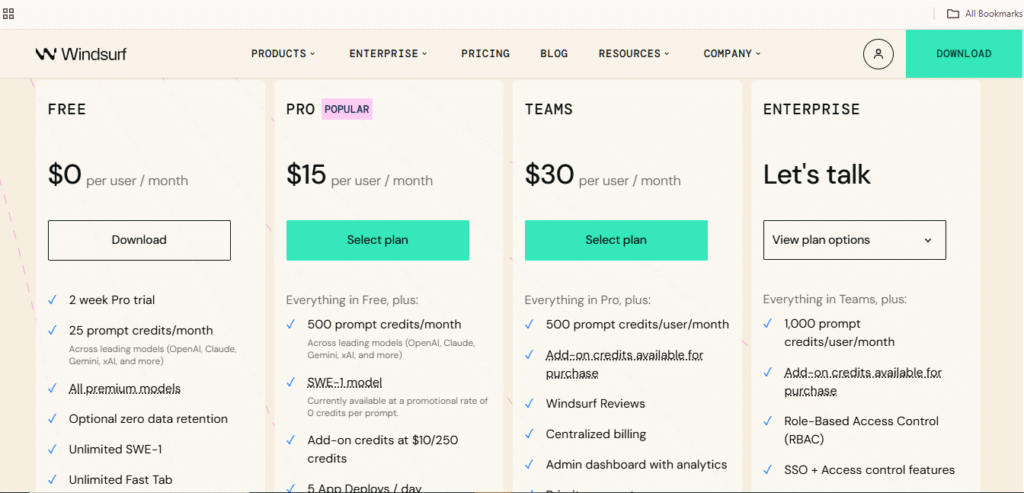
Windsurf offers a Free plan and paid tiers. The Pro plan costs a moderate monthly fee. It includes prompt credits for agent actions. Teams plan adds admin features and more credits. Enterprise options provide custom terms. Free users get limited prompt credits. Heavy users must buy add-on credits.
- Free: $0/month
- Pro: $15/month
- Teams: $30/month
- Enterprise: Chat with sales (price depends on what you desire!)
Assess costs by estimating prompt use. Multi-file Cascade flows use several credits. Suppose you run agents often, plan for higher costs. For hobby projects, the Free plan may be enough.
Who Should Use Windsurf?
Windsurf belongs to multiple categories. Scaffolders of applications have the freedom to work quickly. Shared flows and previews have a benefit for small teams. Students can put in the agent as a tutor of the code. Businesses will have a chance to automate the general operations and accelerate job hiring.
Windsurf may not be hospitable to low-level hardcore. Neither can it be applicable to teams that do not trust remote AI models. Local-first tools may be useful should you need to keep all of the code within a single location.
You can use a n8n to automate your workflow. You can check our n8n review to decide whether you have to use it or not.
FAQs
Is windsurf better than cursor?
At some point, you can say Windsurf is better than Cursor AI. But Cursor AI offers more freedom and benefits, like it can handle complex and big projects, while Windsurf might not. Similarly, there are other things, such as precise control, faster iteration, and features for precise context management.
Is windsurf AI free?
Windsurf AI offers a free plan, but it’s not completely free. Basic features and usage are available for free, but if you want to use it for complicated projects and on an enterprise level, you need to purchase its premium plan.
Is Windsurf AI safe to use?
Absolutely! Windsurf AI is designed and developed with high security. All of your information and data is 100% safe and secure in Windsurf AI. It has a SOC 2 Type II certification and follows other critical compliances to make sure everything is safe and secure.
Is Windsurf based on VSCode?
Yes, many of the Windsurf users have claimed that it is inspired by the VS Code foundation. It supports VS Code importing settings, extensions, and more. Besides, you can also migrate from Visual Studio or use other similar workflows.
What are the disadvantages of using Windsurf?
Windsurf AI is an amazing IDE that can help you in many ways, but some drawbacks are:
- Limited free usage (trial-based)
- Dependence on cloud models
- Performance and stability issues
- Changing behavior or style over time
- AI mistakes and hallucinations
Final Verdict… Is Windsurf AI Worth it?
Windsurf is introducing a new dimension in developer tools. It is a combination of an editor, an AI agent, and a preview, resulting in a single application. That makes many commonly performed tasks a little less frictious. One of the improvements is the Cascade agent, which is genuinely a productivity b






