
Photo editing has evolved significantly over the years due to advancements in technology. With the introduction of AI tools such as Remaker.ai, the editing world has reached new heights. Remaker.ai was created in the world of artificial intelligence, which brings us the most advanced technology of our time.
In this review, we will look into the artificial intelligence features of Remaker.ai, including how well they perform, their ease of use, and the pricing. Is Remaker.ai revolutionary in the world of photo editing, or is it just another tool in the midst of endless photo editing tools?
Let us delve deeper into this.
What is Remaker.ai?
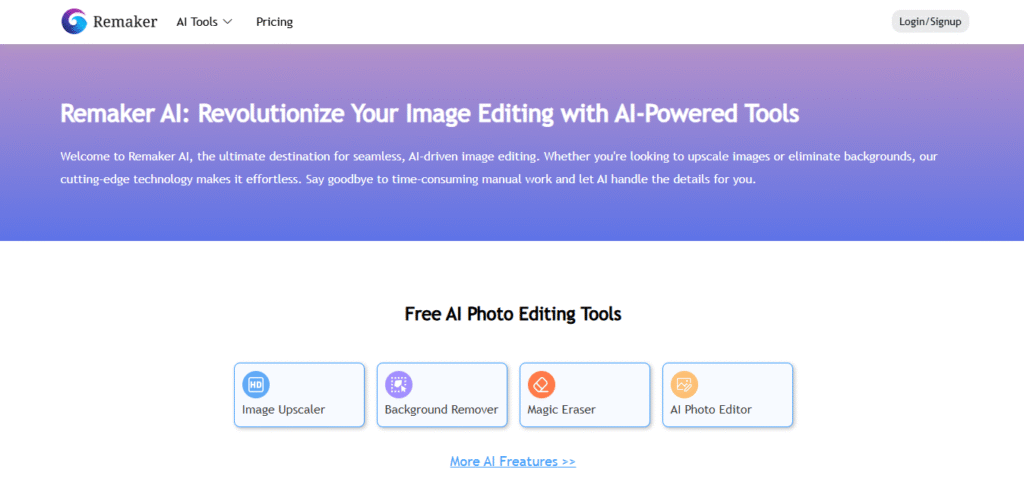
Remaker.ai is an AI-based photo-editing tool aimed at simplifying the tasks of editing and professional image manipulation for the user. Most photo editing tools require some level of knowledge in photo editing, while Remaker.ai requires virtually none, which, in turn, increases the effectiveness of the tools for the user in attaining the ideal image.
Remaker.ai caters to a varied clientele, including professional photographers, social media influencers, and the simply casual user. Every user is given access to an uncomplicated interface and a broad scope of customizable photo editing options such as background removal, skin retouching, the addition of special effects, and much more.
Key Features of Remaker.ai
The following are some of the key features of Remaker.ai:
1. AI-Powered Enhancements:
The most interesting and valuable feature of the AI tools offered by Remaker.ai is automated image editing. Almost all image adjustments, including lighting, color enhancement, and contrast change, can be done by the software with little to no user input.
2. Background Removal and Replacement:
The most impressive feature is background removal and replacement. Users eliminate the need to manually trace, mask, and cut intricate sections of images. AI replaces the background seamlessly and effortlessly. Users can remove the background of an image with the click of a button. There are also other tools for background removal. So we reviewed one called Pixelcut AI.
3. Skin Retouching and Portrait Enhancement:
For portraiture, Remaker.ai can achieve a balanced and smooth skin tone, clear blemishes, and implement minor adjustments to the facial features, resulting in a professional and polished photo without the need for professional photo editing.
4. Object Removal and Editing:
The tool can also detect and exclude the material that does not belong, people in the background, or elements that can be distracting. Using AI, these features can be omitted, and the rest of the picture preserved.
5. Creative Filters and Effects:
In addition, Remaker.ai has a collection of artistic filters and effects that can redefine your images. AI-generated filters can dramatically alter the sentiment of your images, whether they be vintage, modern, or futuristic.
6. Batch Editing:
For users who have several images to edit, Remaker.ai provides the convenience of processing batch edits. You can, for instance, edit a collection by applying the same adjustments. This is especially useful in saving time and effort for larger projects.
Remaker.ai’s AI-Enabled Photo Editing: Does It Deliver?
Concerns regarding AI-based tools for photo editing focus primarily on their inaccuracy. Remaker.ai, however, has proficient AI capabilities that analyze images and deliver contextually relevant edits.
The ability of the background removal feature to discern the photograph’s main subject from the photograph’s complex background demonstrates its precision. The result is clean and sharp outlines. Likewise, the skin editing applied in the portrait feature is unobtrusive and certainly much more appealing to the eye than other editing programs, which produce an unnatural, plastic-like effect.
For intelligent and advanced color and tonal adjustments, Remaker.ai is unrivaled by other programs. The AI performs its task in a way that properly enhances the image without the unwanted over-editing that is common in photo-editing tools.
However, the AI is not without imperfections in its design. In the rare complicated situations described above, the overlapping or intricate objects can produce underwhelming output. The majority of users, in such situations, find the ability to adjust the image manually more than adequate.
User Experience & Interface
Remaker.ai focuses on minimalist design and user accessibility. The interface is straightforward and user-friendly, making the tool ideal for novice users and even those without any experience in photo editing. After the first image is uploaded, the tool examines the photograph and puts forth a set of editable suggestions. After you receive the suggestions, you may modify the suggestion, apply a different filter, and apply numerous effects to the image.
In relation to the tool, the AI is very prompt. The photo is processed in a time span of seconds. The user has the option of seeing a real-time preview of the image or an edited version of the image, which allows for rapid editing. The user has the help of a pre-defined workflow, which may assist the user, especially during their first experience with photo editing.
Remaker.ai isn’t complex, but it does provide enough functionality in photo editing to keep the users’ satisfaction, who want to go deeper in the editing process. Users who want less control over the process will also be catered to.
Pros and Cons
| Pros | Cons |
| AI-powered features that automate complex tasks | May struggle with highly intricate backgrounds |
| User-friendly interface suitable for beginners | Some advanced users may find the customization options limited |
| Fast processing speed with real-time previews | Limited export options for certain file types |
| Batch editing support for multiple images | Some features require a paid subscription |
| Background removal and replacement work seamlessly | Occasional minor imperfections in object removal |
Comparison With Alternatives
Photo editing tools are numerous, and AI tools are no exception. In the following section, I will present photo editing tools and compare them to Remaker.ai.
1. Adobe Photoshop
Adobe Photoshop is recognized as the gold standard in photo editing. It has many high-quality and professional features and tools. Nevertheless, it is challenging to learn, and many skills, coupled with time, are needed to truly master the program. In contrast, Remaker.ai aims to make the editing process much more tractable, employing AI to steps that would generally take hours in Photoshop to accomplish.
2. Fotor
Another AI-enabled photo editing software, Fotor, offers many functionalities resembling those of Remaker.ai, including features for removing backgrounds and retouching skin. Though Fotor is cheaper, it is qualitatively inferior to Remaker.ai because of its limited AI functionalities and customizability.
3. Canva
Also widely known for its extensive templates and user friendliness, Canva is very helpful for basic photo editing and social media graphics. Nonetheless, it does not match the advanced AI features that Remaker.ai possesses. If more automated enhancement is your goal, then Remaker.ai is the optimal alternative.
4. Luminar AI
Remaker.ai and Luminar AI share a commonality in automated photo editing powered by AI, but Luminar AI is aimed more at professional photographers and offers more options for extensive customization. If simple automated edits with little work are your goal, Remaker.ai would serve your needs more effectively. Nevertheless, Luminar AI excels in advanced customization.
Comparison Table
A comparison table can be found here:
| Feature | Remaker.ai | Adobe Photoshop | Fotor | Canva | Luminar AI |
| AI-powered features | Yes | No | Yes | No | Yes |
| Background removal | Yes | Yes (manual) | Yes | Yes | Yes |
| Portrait enhancement | Yes | Yes (manual) | Yes | Yes | Yes |
| Object removal | Yes | Yes (manual) | Yes | No | Yes |
| Batch editing | Yes | Yes | No | No | Yes |
| Ease of use | High | Low | High | High | Medium |
Pricing & Plans
Remaker.ai provides a range of credit plans to accommodate different needs. Credit purchases come with discounts, so the more credits you acquire, the more you save. Depending on how many you plan to use, you will be able to select one of the several options.
- Free: $0 (Limited credits)
- 530 Credits: 53 Credits/US$ – $9.99 (38% off)
- 200 Credits: 33 Credits/US$ – $5.99
- 1100 Credits: 55 Credits/US$ – $19.99 (40% off)
- 3000 Credits: 60 Credits/US$ – $49.99 (45% off)
- 20000 Credits: 67 Credits/US$ – $299.99 (50% off)

Who Should Use Remaker.ai?
Remaker.ai is designed for those who want to enhance their images with minimal effort, as opposed to the complex software tools with a steep learning curve. If you are a social media manager looking to elevate your content, a photographer in need of fast edits, or an individual seeking to improve your personal photos, Remaker.ai is the solution for you.
AI tools, rapid, high-quality edits, and other advanced features provided by the platform are a welcome offering to professionals. Its simple design will also serve novice users well. This platform is also good for small companies that are pressed for time to revise images of their goods or promotional products.
FAQs
1. Is Remaker.ai free to use?
Remaker.ai has limited capabilities under its free plan, while all the tools are accessible under the paid plan.
2. Can I use Remaker.ai for professional photo editing?
Remaker.ai is definitely an option for simplicity and automation in professional photo editing. For intricate work, other software, like Adobe Photoshop, will still need to be utilized.
3. Does Remaker.ai support batch editing?
Yes, the Pro and Business plans include batch editing support for users working with multiple images.
4. How accurate is Remaker.ai’s background removal tool?
Remaker.ai’s background removal tool is accurate for most uses, yet it can have trouble with complex and intricate background details.
5. Can I use Remaker.ai for graphic design?
Although Remaker.ai concentrates on photo editing, it also provides some innovative filters and effects that might facilitate basic graphic design functions.
Final Verdict… Is Remaker.ai Worth it?
Remaker.ai is an ideal photo editing solution for those who prefer minimal effort while achieving high-quality results. The company’s photo editing AI technology is accessible to all users and all skill levels. Its limitations include the occasional difficulties editing complex photo backgrounds. Other than that, the software is refined, rapid, and efficient.
Remaker.ai is easy to implement and offers powerful AI editing functionalities. Its cost-friendly photo editing capabilities set it apart from other software editing options.






