
If you’re looking for an honest, experience-based Looka review, this guide breaks down everything you need to know before using the tool. As someone who frequently tests AI design tools and branding generators, I’ve spent time using Looka to evaluate how well it simplifies logo creation, brand identity design, and overall usability.
This Loka review covers how Looka works, its pricing, pros and cons, and how it compares with competitors, so you can decide whether it’s the right AI branding tool for your needs.
What Is Looka?
Looka is an AI-powered logo and brand design platform that helps users create professional-looking logos and full brand identity kits without needing graphic design skills. Other than logo creation, it offers brand guidelines, social media assets, business card designs, and a full Brand Kit to keep all visuals consistent. It allows easy customization of colors, fonts, and icons. The platform is ideal for startups, freelancers, and small business owners. Overall, Looka makes professional branding fast, easy, and accessible.
Who Created Looka?
Looka was founded by Dawson Whitfield, a designer and entrepreneur who aimed to democratize brand creation using artificial intelligence. Looka was officially launched as Logojoy in November 2016 to provide an affordable and quick branding solution for entrepreneurs and small business owners, and was later rebranded to Looka as it expanded from logos to full brand identity tools.
The platform is developed by a team with backgrounds in design, AI, and user experience, which shows in how beginner-friendly the interface is.
How Does Looka Work?
Looka uses artificial intelligence to create logo concepts tailored to your brand’s preferences, making the design process simple even for non-designers. To get started, you enter your brand name, select your preferred logo styles, colors, and symbols, and the AI generates dozens of unique concepts based on your choices. From there, you can customize fonts, spacing, icons, and layouts using Looka’s intuitive editor, which maintains visual balance, alignment, and color harmony throughout the design process. Once satisfied, you can download your logo directly or choose to upgrade to the full Brand Kit for additional branded assets.
Best Features of Looka
1. AI Logo Generator
Looka’s AI logo generator is its core feature, designed to create polished and professional logo concepts. After you provide your brand name, preferred styles, and visual preferences, the AI produces a wide range of unique design options that already feel balanced and visually appealing. You can refine these concepts by adjusting colors, symbols, and typography, but the foundational layout created by the AI ensures that even beginners can end up with a sleek, well-structured logo.
2. Complete Brand Kit
Once your logo is finalized, the Brand Kit automatically generates a complete suite of branded materials, including social media templates, business card layouts, brand guidelines, letterheads, email signatures, and even website mockups. This gives users a consistent visual identity across all platforms and makes Looka a complete branding solution rather than just a logo maker. For small businesses, startups, and freelancers, the Brand Kit can save hours of manual design work.
3. Easy-to-Use Customizer
Looka’s customizer is designed to be simple and intuitive, making it accessible even for users with no design background. The editor allows you to adjust nearly every aspect of your logo, including icon styles, font spacing, and color palettes, all without disrupting the visual balance created by the AI. Real-time mockups help you visualize how your logo will appear on items such as business cards, websites, packaging, and merchandise.
4. High-Resolution Downloads
One major advantage of Looka is its ability to provide high-resolution and professional-grade file formats. After purchasing a logo package, you can download your design in PNG, SVG, EPS, and transparent background versions. The availability of vector files is particularly important because they allow the logo to be scaled for printing on signage, merchandise, packaging, and other large-format uses without losing quality.
5. Unlimited Logo Edits
Looka stands out by allowing users to make unlimited edits to their logo even after purchase. This flexibility is useful for businesses that may update their branding over time or need to adjust elements as they grow. Whether you want to tweak colors, modify fonts, or try a new layout, Looka gives you the freedom to evolve your brand identity without paying extra for every revision.
Pros and Cons
Pros
- Very easy for beginners
- AI provides strong design foundations
- Full Brand Kit helps create consistent branding
- High-quality vector logo files
- Unlimited edits after purchase
- Great for quick turnarounds
Cons
- Some designs can feel similar to other AI-generated logos
- Subscription required for full brand assets
- Not ideal for highly custom or complex designs
- No true collaborative editing for teams
Pricing
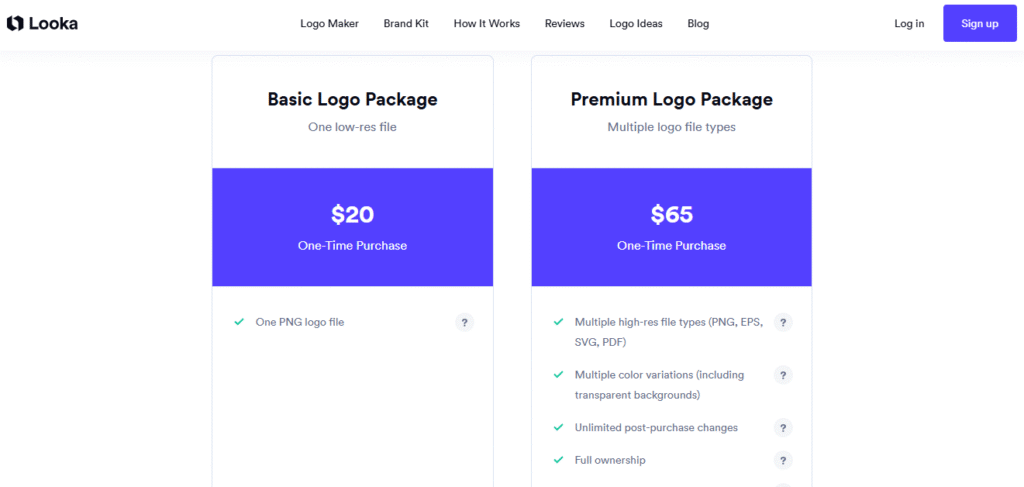
Looka offers both one-time logo purchases and subscription-based brand kits, giving users flexibility depending on their needs. For single-logo buyers, the Basic Logo Pack starts at $20 and includes only low-resolution files, while the Premium Logo Pack costs $65 and provides high-resolution files, vector formats, brand guidelines, and full commercial rights.
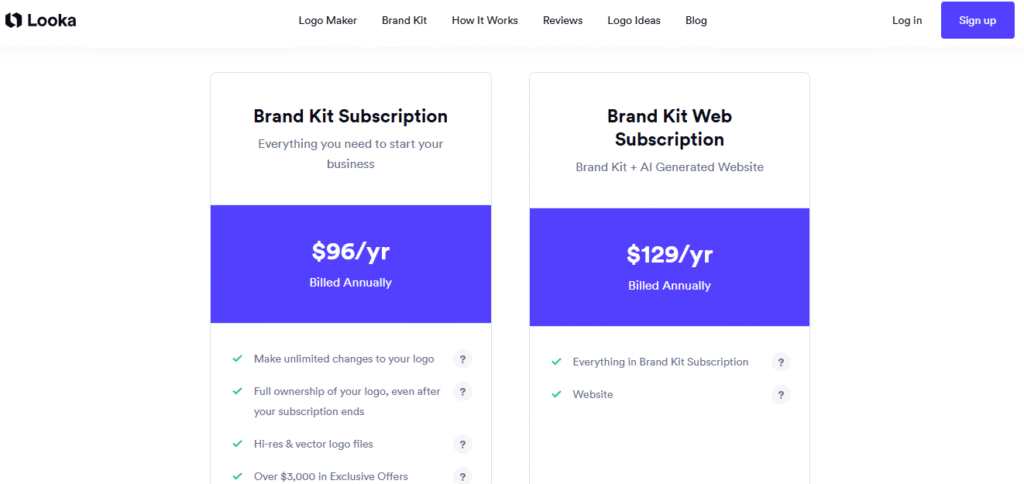
For those who want a complete branding system, Looka’s Brand Kit is available as a $96-per-year subscription, or you can choose the Brand Kit + Logo Package for $192 per year, which unlocks all social media templates, business card designs, branded materials, and unlimited logo edits. Overall, Looka’s pricing is competitive compared to hiring a professional designer, but the annual subscription may feel costly for very small or early-stage businesses.
Comparison With Competitors
| Feature | Looka | Canva | Wix Logo Maker |
|---|---|---|---|
| AI Logo Generation | Yes | Limited | Yes |
| Customization Flexibility | High | Very High | Medium |
| Subscription Required | Yes | Yes | No |
| Full Brand Kit | Only for Brand Kit | Optional | Optional |
| Ease of Use | Very Easy | Easy | Very Easy |
| Best For | Startups needing branding | Designers & general creators | Website-focused users |
Personal Experience
When testing Looka for a real project, I was impressed with how quickly the AI generated usable logo concepts. The balance and spacing were surprisingly professional for automated output. However, I noticed that some icons felt generic, so I had to experiment with multiple styles before finding a unique option.
The Brand Kit, though, felt extremely practical, especially the ready-made social templates. It saved me hours compared to building everything manually in Canva or Illustrator. I have also used NameMakers to give users a good review so they can decide whether to use it. One of them is Namelix.
Frequently Asked Questions
Is Looka worth it for small businesses?
Yes, if you need fast, affordable branding without hiring a designer. The Brand Kit is especially useful for new businesses.
Do I own the rights to my Looka logo?
Yes. Looka grants full commercial rights once you purchase the logo package.
Can I edit my logo after buying it?
Yes, Looka allows unlimited edits even after purchase.
Is Looka better than Canva for logo design?
Canva offers more creative freedom, but Looka generates more polished logos automatically. For beginners and non-designers, Looka is simpler.
Does Looka offer a free version?
You can design logos for free, but downloading them requires payment.
Final Thoughts
Looka is a strong AI-powered branding tool for users who want a professional logo and cohesive brand visuals. It’s especially valuable for startups, small businesses, freelancers, and creators who need fast, consistent branding.
While it may not replace a fully custom design process, it offers excellent value for anyone wanting clean, modern branding produced in minutes.
If you want to test an AI branding tool that balances simplicity and professional results, Looka is definitely worth considering.






