

Ideogram got my attention on a late night when I was stuck with a client project and needed a quick design. I wanted something fast, clean, and not too complicated. I was scrolling around and saw people sharing text-perfect AI posters that looked like they were made in a studio. That pulled me in. I opened Ideogram to see if it was actually good or if it was another platform that makes big promises but delivers mixed results. After using it for quite some time, I got a clear view of where this tool shines and where it still needs improvement.
In this Ideogram review, we delve deep into what Ideogram can do, how it performs, its limitations, and whether it’s really worth using for quick designs.
What Is an Ideogram
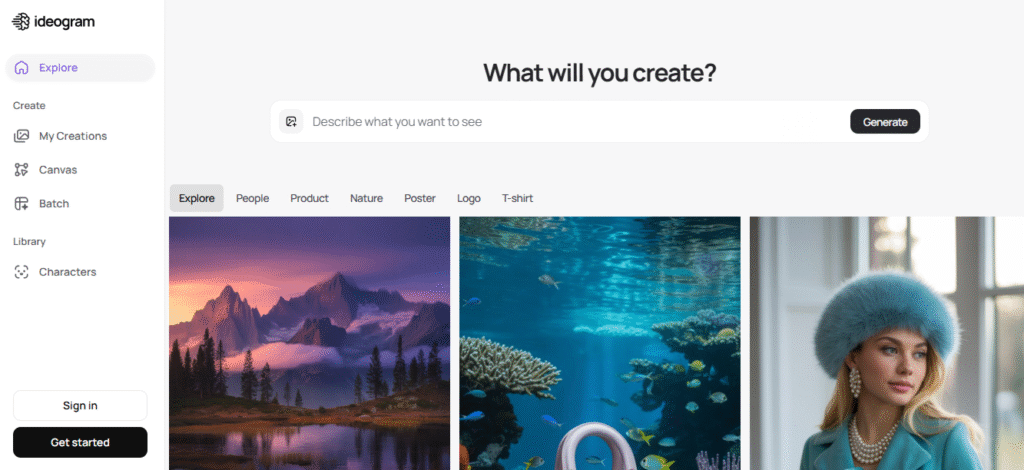
Ideogram is an AI design tool that generates images from text prompts. You type a short description, and it produces visuals that look almost studio-made. The thing that makes it stand out is its ability to generate clean and readable text inside images, something many AI tools still struggle with. Users can create posters, ads, t-shirt prints, book covers, sticker-style graphics, and even realistic scenes. It offers templates and styles that guide your creativity when you don’t know where to start.
The platform runs in the browser; no installations are needed. Its interface feels light, which makes it easy to use even if someone has zero experience with design tools. You can log in with Google or email and start generating right away.
Key Features of Ideogram
Ideogram gives several tools that help users create visuals fast. These are the main features you will notice when you start using it.
Strong Text Rendering
One thing that sets Ideogram apart is how it puts text inside images. Most AI tools struggle with text, but this one handles it nicely. You can ask for short phrases, slogans, or product names, and the tool usually prints them clearly. Sometimes there are small mistakes, but the success rate is still high compared to other generators.
Plenty of Styles
The tool offers many style categories. You can create minimal posters, bold typography visuals, vintage artwork, digital painting, T-shirt designs, cartoon sketches, and so on. The variety helps when you want to test different ideas. You can switch styles quickly without changing your prompt too much.
Fast Generation Time
Ideogram generates images in a few seconds. That helps users who want fast results. If you work on social content or daily design tasks, speed matters. You can create multiple variations and choose the best one. The fast output makes it useful for brainstorming.
Remixes and Variations
The tool lets you adjust and remix outputs. You can fix small elements or create variations. This helps when you like the overall design but want a different color, angle, or layout. It saves time so you don’t start from zero.
Community Gallery
Ideogram has a public gallery where people share their creations. If you have no idea what to create, you can scroll through the gallery. It shows trending looks and prompts that you can reuse. This feature is helpful when you want inspiration.
How Easy Is Ideogram to Use
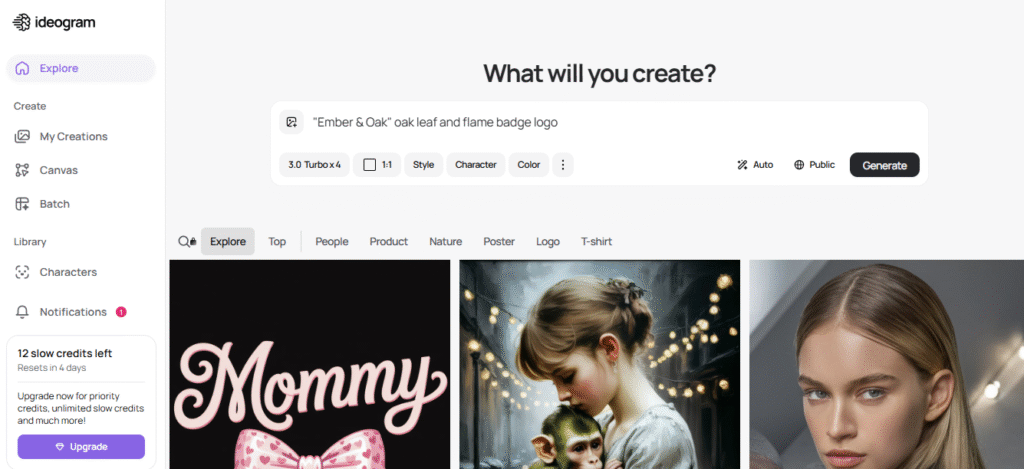
The tool was made to be beginner-friendly. When you sign up, you get a simple workflow. You type what you want, pick a style, and hit create. You do not need advanced knowledge of shading, color balance, or typography. The AI handles those parts.
People who are not designers can still create visuals that look neat. Designers who already understand structure may get even better results, because they know how to describe their ideas. The tool works for both groups.
Competitor Comparison
Ideogram stands among big names like Midjourney, Canva AI, Leonardo AI, and Adobe Firefly. Each tool has its strengths, so here’s a quick comparison.
Ideogram vs Midjourney
Midjourney is known for highly realistic art. It produces cinematic visuals. But it struggles with text. Ideogram is better if you want posters or designs with clean typography. Midjourney wins in artistic depth, but Ideogram wins in design accuracy.
Ideogram vs Canva AI
Canva AI is easy and has strong editing features. Canva AI gives templates and drag-and-edit options. Ideogram generates better text-based graphics, though. Canva is a full editor, while Ideogram is more like a creative generator.
Ideogram vs Leonardo AI
Leonardo is great for 3D and gaming-style art. It creates strong textures. But for quick designs with readable text, Ideogram comes ahead. Leonardo is more for niche artwork.
Ideogram vs Adobe Firefly
Firefly works well for commercial-safe content and brand-friendly visuals. Adobe also offers strong editing tools. Ideogram still wins in text quality and speed for simple designs.
Image Quality Of Ideogram
Ideogram produces images that look smooth and refined. The tones, lighting, and details feel consistent. When generating logos or flat designs, the tool stays sharp and doesn’t distort the edges. On the other hand, realistic images sometimes appear slightly soft, though it’s not a dealbreaker.
The most impressive part is the text accuracy. If you ask for a poster with multiple lines of text, Ideogram usually gets everything right. Other AI tools tend to twist letters or merge words, but here, most outputs remain readable.
Pricing: Is It Worth Paying For
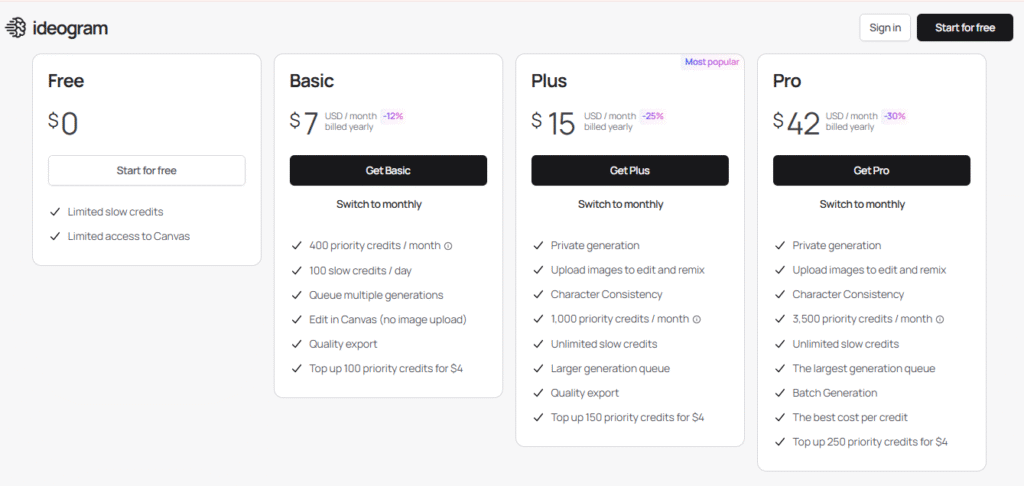
Ideogram offers both free and paid plans. The free plan gives basic image generation with some limits. Free Plan costs $0. You get limited slow credits and limited Canvas access. Good for testing the tool.
Basic Plan priced at $7 per month when billed yearly. You get 400 priority credits a month, 100 slow credits a day, the ability to queue multiple generations, Canvas editing, quality export, and you can top up 100 priority credits for $4.
Plus Plan priced at $15 per month, billed yearly. It gives private generation, image upload for edit and remix, character consistency, 1,000 priority credits a month, unlimited slow credits, a larger generation queue, quality export, and top up 150 priority credits for $4.
Pro Plan is priced at $42 per month, billed yearly. You get private generation, image upload and remix, character consistency, 3,500 priority credits a month, unlimited slow credits, the biggest generation queue, batch generation, best cost per credit, and top up 250 priority credits for $4.
The paid plan increases the number of generations, offers higher-quality outputs, and provides more advanced features. If you’re someone who creates designs regularly, the paid plan becomes worth it. For casual use, like posters or occasional graphic ideas, the free plan might be enough.
Pros and Cons of Ideogram
| Pros | Cons |
| Very accurate text generation | Some realistic images look slightly soft |
| Clean interface, easy to use | Advanced prompts sometimes misinterpret details |
| Fast generation speed | No deep custom editing tools inside the platform |
| Great typography styles | Some styles repeat if prompts are similar |
| Helpful community and feed | Free version limits feel tight for heavy users |
Common Mistakes When Using Ideogram
Some people use overly detailed prompts and confuse the model. When you keep prompts simple and direct, the results stay accurate. Another issue is relying only on presets. You can get better images when you experiment a bit. Also, if you ask for long text blocks, the model sometimes rearranges spacing. Keep text shorter for best results.
FAQs
What makes Ideogram different from other AI design tools?
Ideogram handles text inside images better than most AI tools. Its typography accuracy helps you make posters, ads, and graphics without distorted letters.
Is Ideogram free to use?
It offers a free plan with limited generations. The paid plan gives higher quality, faster results, and more creative control.
Can I control styles and layout in Ideogram?
You can guide the layout through prompts and style options. It doesn’t offer deep manual editing, but the model responds well to clear instructions.
Does Ideogram support commercial usage rights?
Commercial rights depend on your subscription level. Check their latest terms because rules may change with updates.
Does Ideogram support custom image uploads?
It supports image‑to‑image prompts but not full advanced editing. The main focus is fresh generation rather than heavy modification.
Is Ideogram worth paying for if I create daily designs?
If you design often, the paid plan saves time and gives better consistency. Heavy users benefit the most from the upgrade.
Final Verdict: Is Ideogram Good for Quick Designs
Yes, Ideogram is very good for fast design creation. It delivers clean typography, sharp layouts, and consistent results. It won’t replace high-end design tools, but it cuts down creation time drastically. If you need posters, ads, or visual ideas in minutes, this tool does the job.
Its strengths lie in speed and accuracy. If the team keeps improving the model, Ideogram might become one of the top players in AI design.





