
Fyxer AI is an intelligent productivity assistant that helps save time when managing manual administration and provides better control over the inbox and the calendar.
Fyxer is designed to support common bottlenecks of workflows, such as triage of emails, calendar management, and follow-ups, built around founders, solopreneurs, and executives.
I have introduced many AI productivity tools in various industries, and Fyxer is the one that seems to have an advantage over me, in my opinion, compared to the other tools, because of its capability to think and act comparably to a human executive assistant.
In this Fuxer AI review, I will be looking more closely at its main features, performance in the real world, price, and suitability for your business.
Fyxer AI: Quick Summary
| Fyxer AI | |
| Best for | Founders, executives, solopreneurs |
| Rating | 4.5 out of 5 |
| Free trial | Yes – 14 days |
| Paid plans | $49 – $99/month |
What is Fyxer AI? On-Demand Virtual Help
Fyxer AI is an artificial intelligence assistant for your email, calendar, and meetings. It integrates into Gmail or Outlook and automatically classifies your inbox as useful things, such as To Respond or FYI, letting the spam and noise out. It is also writing your replies in your tone, and thus, you are basically reading and sending.
Fyxer can also be one of the people in your meetings serving as a notetaker, and then they can send you a concise summary and recommended follow-up messages immediately after the call. It improves with time as it trudges your writing style and habits, which results in increasing accuracy of its drafts and suggestions. It has plans that begin with a 7-day free trial for individuals, teams, and enterprises.
The Fyxer AI Philosophy
| Step | Action | Outcome |
| 1. Ingestion | Incoming Email Arrives | Raw data enters the system. |
| 2. Analysis | Fyxer AI Analyzes (Triage, Prioritize, Learn) | The AI categorizes the email and identifies if a reply is needed. |
| 3. Action | Organized Inbox & Drafted Replies | The inbox is sorted with labels, and a draft is prepared in the user’s tone. |
| 4. Control | User Action (Review, Edit & Send) | The user has the final say, ensuring 100% control and accuracy. |
Fyxer AI Target User Profile
| User Type | Primary Pain Point | How Fyxer Helps |
| Sales Executive | High volume of leads and follow-ups | Ensures faster lead response times and automates follow-up drafting. |
| Founder / CEO | Overwhelmed by admin, lacks time for strategy | Handles email triage and meeting notes, freeing up hours for high-level thinking. |
| Real Estate Agent | Juggling inquiries from multiple clients and listings | Guarantees no inquiry is missed and follow-ups are sent promptly. |
| Customer Success Manager | Managing a large portfolio of customer communications | Saves 1-2 hours per day on email, allowing more time for proactive customer engagement. |
My Experience With Fyxer AI
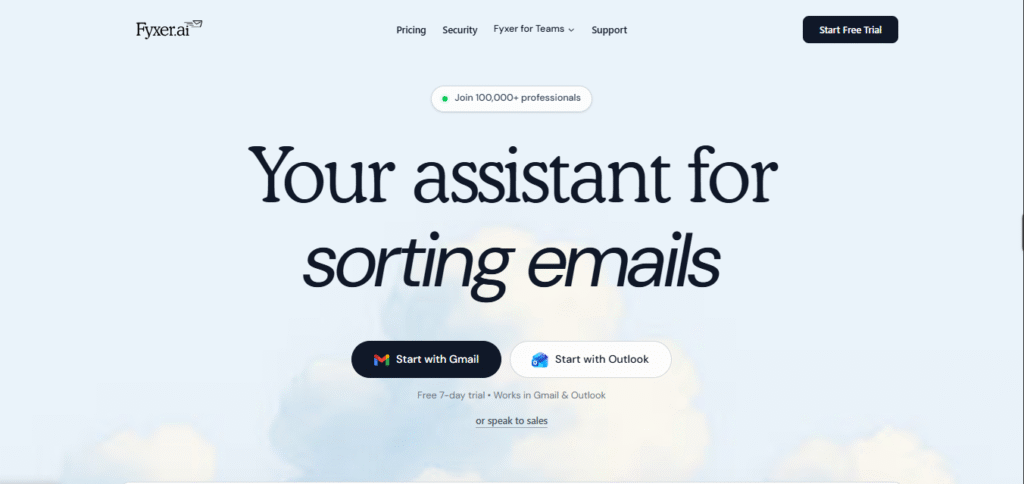
My experience in Fyxer AI is highly positive to date. Once I had it connected to my Gmail, it began sorting my inbox into nice categories, such as To Respond, FYI, and Meetings. This simplified my task of knowing what was actually required of me. The replies written by the AI were surprisingly close to my own normal writing style, meaning that I only had to edit them a bit. The meeting notes option offered by Fyxer is also useful: it sends a brief overview and follow-up after each conference call. I feel less stressed opening my inbox now, and I save time every day because I’m not reading or writing every email from scratch.
How to Use Fyxer AI: A Step-by-Step Practical Guide
One of Fyxer’s biggest strengths is its simplicity. Based on my experience, getting started is incredibly straightforward, which is a core part of their product-led growth strategy.
Step 1: 1-Click Connection
The journey begins with a single click. Fyxer connects to either a Gmail or Outlook account seamlessly. They offer a 7-day free trial for their plans. It’s worth noting that they do require a credit card to start the trial. As an analyst from Growth Unhinged pointed out, this feels reasonable for a tool that requires access to sensitive data like your email, as it filters out less serious users.
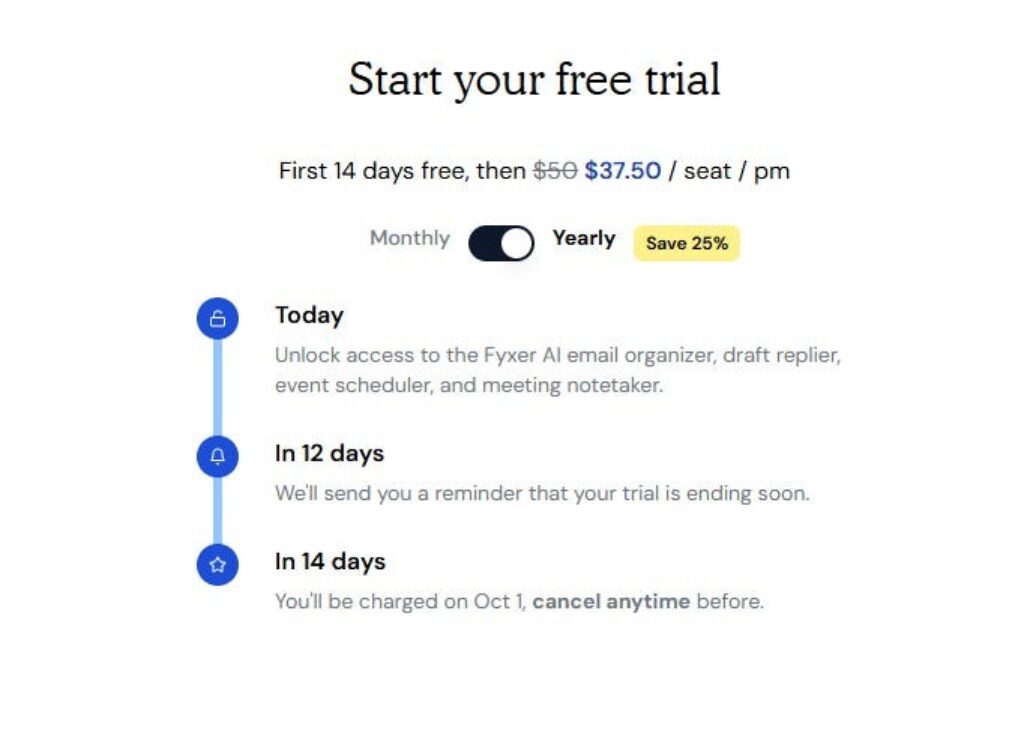
The Fyxer trial page clearly outlines the terms, including the 14-day free period (Note: trial length may vary) and pricing.
Step 2: The Onboarding Experience
Once connected, Fyxer immediately begins analyzing your past email history to learn your communication style. The onboarding process is slick and constantly reinforces the value you’re about to receive. One particularly bold move is the team invitation prompt. Fyxer offers a significant credit (I saw an offer for $50.00) for each teammate you invite. This is an aggressive but clever growth tactic to drive team adoption from the very beginning.
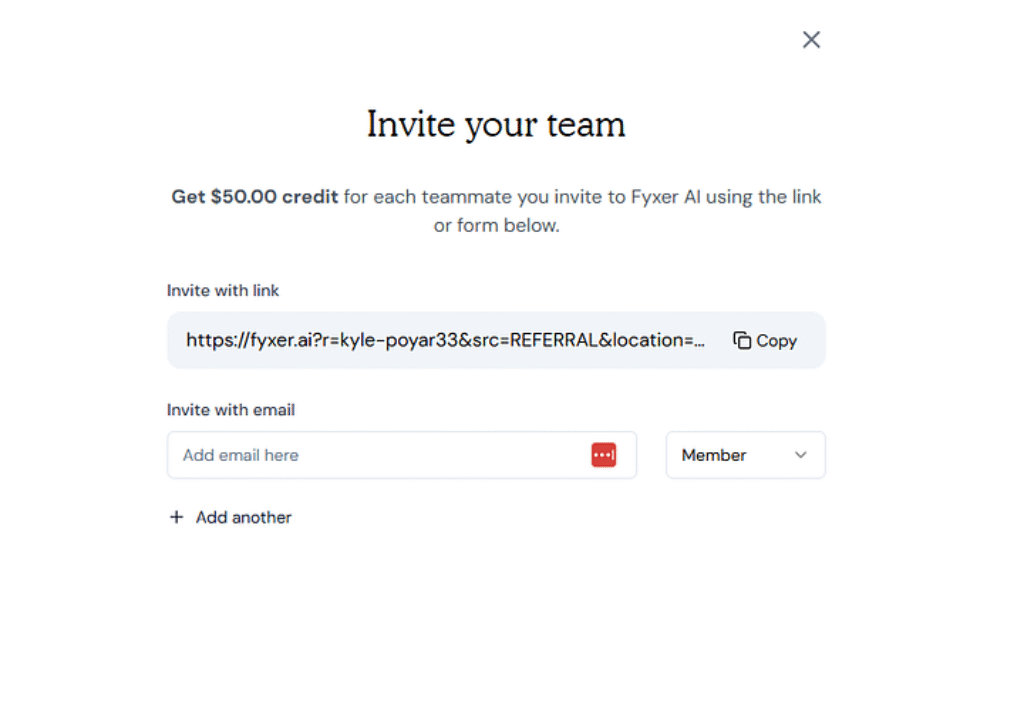
Fyxer’s onboarding aggressively encourages team adoption with a referral credit system.
Step 3: Your First Day with Fyxer
The real “aha!” end of the day comes the following day. Your inbox will be sorted, and more impressively, there are draft replies awaiting employees who mailed in during the night. It is easy to interact with them, as you can refine the draft to its best, submit it as it is, or just get rid of it. It is the endless loop that further reinforces the fact that the final decision is yours as the user.
Step 4: Customizing Your Assistant
Fyxer currently works out of the box, but it is easy to customize its behavior. Within the settings, you are able to customise the style prompt. As an example, you can further refine the output of the AI by adding a few words, such as “I like short and friendly email,s” to ensure the AI produces the content that is more directed towards your tastes.
Fyxer Onboarding in 4 Steps
- Connect Account: Authorize Fyxer with your Gmail or Outlook in one click.
- AI Learns Your Voice: The system analyzes your sent mail to understand your unique style.
- Review First Drafts: Within hours, see the first AI-generated replies in your drafts folder.
- Invite Team & Customize: Encourage colleagues to join and tweak settings to refine the AI’s behavior.
Initial Setup & Customization Options
| Setting | Recommended Action | Impact |
|---|---|---|
| Tone of Voice Prompt | Add a sentence like, “Always be professional but approachable.” | Refines the personality of the AI-drafted replies. |
| Signature | Ensure your standard email signature is correct. | Guarantees all drafts include your proper sign-off. |
| Meeting Preferences | Set default availability and meeting link (e.g., Zoom, Teams). | Automates scheduling suggestions in drafted emails. |
| Label Management | Review the default labels and adjust if needed. | Customizes the triage system to your specific workflow. |
Fyxer AI Pricing: What Do You Get for Your Money?
Fyxer AI offers three pricing plans, all built to suit different types of users — from solo professionals to enterprise teams.
Each plan includes a 7-day free trial, so you can test the tool without committing upfront. Pricing is billed annually, with per-user pricing that scales depending on your needs.
Here’s a full breakdown of what each plan includes:
| Plan | Price (Billed Annually) | Best For | Key Features |
| Starter | $22.50/user/month | Solo users or founders | 1 inbox + calendar, smart sorting, reply drafting, meeting suggestions, note-taking, chat support |
| Professional | $37.50/user/month | Managers and small teams | All Starter features plus: multi-inbox support, cross-time zone scheduling, CRM integration, email attachment summaries, and onboarding |
| Enterprise | Custom pricing | Mid-size to large organizations | All Professional features plus: account manager, SSO & SCIM, custom security controls, usage insights |
Future of Fyxer and the AI Productivity Landscape
Fyxer’s rapid ascent isn’t happening in a vacuum; it’s a signal of a much larger shift in how we work. The company’s trajectory gives us clues about its own future and the broader AI productivity market.
For Fyxer itself, the path forward seems clear. With a strong foothold in enterprise and a focus on specific verticals like Real Estate, I expect them to deepen their workflow integrations. This means tighter connections to CRMs, more sophisticated team-level analytics for managers, and potentially proactive AI features that don’t just draft replies but suggest actions based on email content (e.g., “It looks like you promised to send a report. Should I create a task?”).
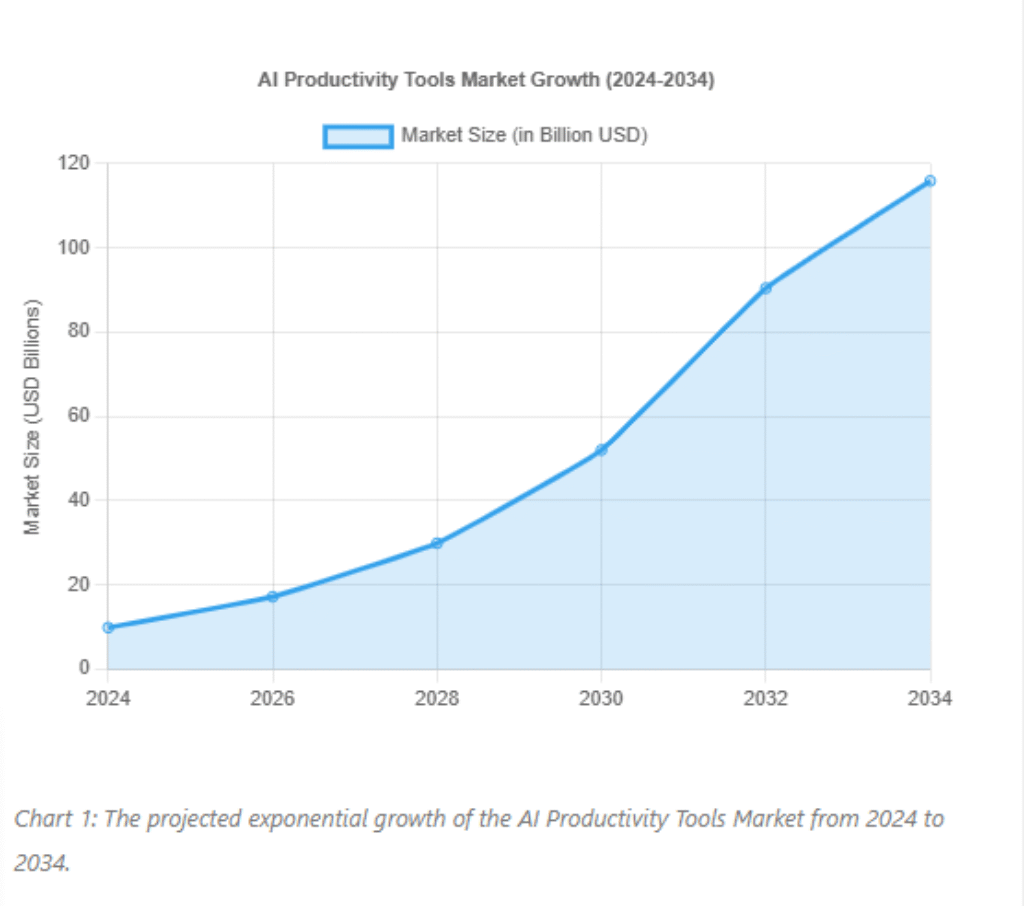
This aligns with broader industry trends. The AI Productivity Tools market is projected to explode, reaching USD 115.85 billion by 2034, up from USD 9.89 billion in 2024, at a compound annual growth rate of 27.9%. This growth is fueled by tangible results. A study from the Wharton School projected that generative AI could boost productivity by 1.5% by 2035, a significant macroeconomic impact.
Inspiration for Builders & Users
- For AI Founders: Fyxer’s story is a powerful lesson in the value of deep domain expertise. Solving a “boring,” universal problem you understand intimately is often more valuable than chasing a fleeting trend.
- For Professionals: The era of practical, accessible AI is here. Tools like Fyxer demonstrate that AI is no longer a novelty for tech enthusiasts but a genuine utility for solving everyday professional challenges.
Pros and Cons Recap
Here’s a quick breakdown based on 30+ days of use:
| Pros 👍 | Cons 👎 |
| Impressive natural language understanding | No mobile app (yet) |
| Saves time without losing control | Doesn’t integrate with CRMs or project tools |
| Learns your workflow without needing complex rules | Not ideal for teams or companies with shared inboxes |
| Helpful, accurate email suggestions and follow-ups | Higher-tier plan required for best features |
| User-friendly dashboard and clean UX |
Fyxer AI vs. The Competition: Where Does It Stand?
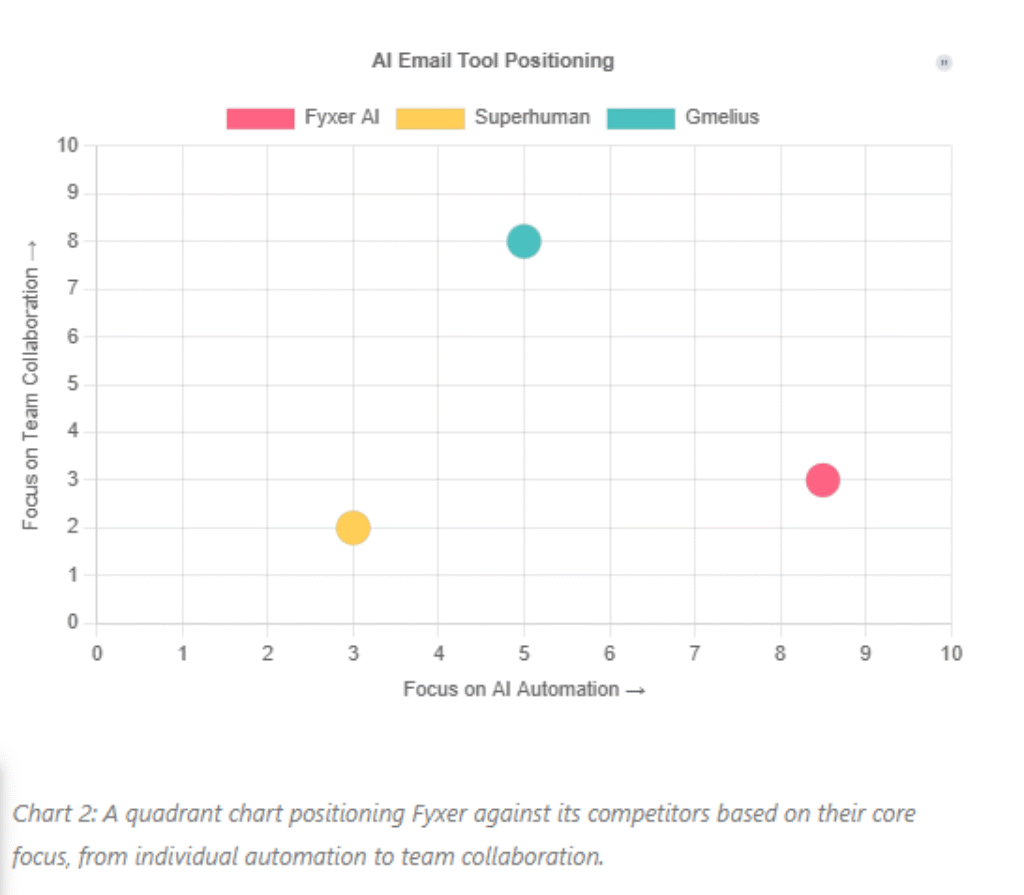
The AI productivity space is heating up, with several tools vying to manage your inbox. I’ve tested many of them, and Fyxer occupies a unique position. Here’s how it compares to two other major players: Superhuman and Gmelius.
Fyxer vs. Superhuman
It is a typical comparison, yet they are putting up solutions to the world in fundamentally different approaches. Superhuman is a high-quality email app that is fast, with a beautiful design as well as useful shortcuts and key commands that make it faster to process your inbox by hand. Fyxer, on the other hand, is all about the AI automation. It uses another client than the one you have to do the work.
- Focus: Fyxer prioritizes AI automation (auto-sorting, auto-drafting). Superhuman prioritizes manual speed and control.
- Integration: Fyxer is an AI layer for Gmail/Outlook. Superhuman is a standalone, closed-system email client that does not allow third-party integrations like Fyxer.
- Learning Curve: Fyxer’s automation is intuitive from day one. Superhuman has a steeper learning curve, requiring users to master its system of shortcuts.
Fyxer vs. Gmelius
This analogy shows how Fyxer puts emphasis on individual performance against teamwork. Gmelius converts Gmail into a full-fledged collaborative workspace, which has such functions as shared inboxes, advanced rule automations, and deep team analytics. Fyxer is also more of a personal assistant, though it is used by a team.
- Focus: Fyxer is a personal/team productivity booster. Gmelius is a comprehensive team collaboration platform built inside Gmail.
Limitations: Compared to Gmelius, Fyxer lacks features like shared inboxes and has fewer deep integrations with other business tools. Its strength is simplicity and powerful AI, not complex, collaborative workflows.
My Opinion About Fyxer AIFpre
What I Like
✔️ Smart inbox filtering that improves over time
✔️ Natural language prompts to delegate tasks (e.g., “Schedule with Sarah next week”)
✔️ Saves 5–10 hours weekly by automating low-value admin
✔️ Works seamlessly with Gmail, Outlook, and Google Calendar
✔️ Personalized email drafts that require minimal editing
What I Don’t Like
❌ No mobile app yet
❌ Limited integrations beyond email and calendar tools
❌ Higher-tier plan needed for serious productivity gains
❌ Learning curve for natural language task prompts
Why You Can Trust This Review
To write this review, I tested Fyxer AI for over 30 days using it across two email accounts, a synced calendar, and a simulated client management workflow.
I’ve compared it against other leading AI assistants like Superhuman AI, Reclaim, and Motion. All opinions here are based on actual usage, not speculation.
Final Verdict: Should You Use Fyxer AI?
Fyxer AI is your top choice when you feel overwhelmed by an increasing number of low-level administrative tasks and need to reclaim an hour or two per week.
It is not a magic wand; you will still have to be monitoring what it does, particularly in the initial stages. However, when it gets to know how you behave, the tool is really helpful.
I also realized that my email overload decreased, there were fewer tasks dropped, and more organization when it comes to control over my week.
As a single founder, consultant, or executive, it is one of the most optimal artificial intelligence assistants on the market today to relieve you of the administrative burden.
Bottom line: Fyxer AI is a smart investment if you want to cut down on admin without hiring a full-time assistant.






