

Meetings are an essential part of modern work life, but taking notes and tracking action items can be tedious and time-consuming. Fathom AI is designed to address this challenge by automatically recording, transcribing, and summarizing online meetings.
In this Fathom AI review, we explore its capabilities, pricing, features, and how it compares to other meeting assistant tools, providing an honest, experience-based perspective for professionals seeking reliable AI-powered note-taking solutions.
What is Fathom AI
Fathom AI is an artificial intelligence-powered meeting assistant designed to simplify the way professionals handle meetings. It integrates with popular online conferencing platforms such as Zoom, Google Meet, and Microsoft Teams to automatically join and record scheduled meetings. Unlike standard transcription tools, Fathom goes further by creating concise summaries, extracting key highlights, and identifying action items. The tool also maintains a searchable archive of past meetings, allowing users to quickly locate specific discussions or decisions.
By transforming meetings into structured, actionable insights, Fathom AI helps individuals and teams stay organized and accountable. Its primary purpose is to reduce the administrative overhead associated with meetings, freeing up time for creative and strategic tasks. For anyone who participates in frequent online calls, Fathom AI can act as a virtual assistant that ensures no important detail is missed.
Who Created Fathom AI
Fathom AI, the company behind the popular AI meeting assistant, was founded by Richard White. The company was established in 2020 and was part of the Y Combinator Winter 2021 batch. Fathom AI was developed by a team of productivity and software experts with backgrounds in SaaS and workplace efficiency solutions. The founders’ goal was to create a tool that not only records meetings but also transforms them into actionable knowledge.
Their experience with remote work challenges, client communication, and team collaboration influenced Fathom’s design, which focuses on ease of use, accuracy, and seamless integration with commonly used business tools. The company emphasizes building AI that complements human workflows rather than replacing them. Features such as AI-generated summaries, highlight clips, and searchable archives reflect a deep understanding of professional needs, particularly for sales teams, project managers, and client-facing professionals. The result is a product that balances automation with practical, real-world usability.
How Does Fathom AI Work?
Using Fathom AI is straightforward, but the technology behind it is sophisticated. The workflow typically begins with connecting your calendar and meeting platforms. Once connected, Fathom automatically joins scheduled meetings as a bot participant. During the meeting, it records audio (and video where applicable), generating a real-time transcript with speaker labels and timestamps.
After the meeting ends, Fathom applies AI algorithms to summarize the discussion, identify key takeaways, and extract action items. Users can review the transcript, edit highlights, or share summaries with colleagues. Transcripts and summaries can be exported in various formats, such as PDF or DOCX, or integrated with CRMs, project management tools, and collaboration platforms like Slack and Notion.
A standout feature is Fathom’s searchable archive. Over time, all recorded meetings accumulate in a centralized library. Users can quickly search for specific topics, decisions, or keywords across multiple meetings, saving hours of manual review. The tool also supports multi-language transcription, making it suitable for global teams.
Best Features of Fathom AI
Fathom AI offers several features that differentiate it from traditional transcription software.
Automatic Recording and Transcription:
Once connected, Fathom automatically joins scheduled meetings and transcribes them with speaker labels and timestamps. This eliminates the need for manual note-taking and ensures that no details are missed.
AI-Generated Summaries and Action Items:
The AI condenses lengthy discussions into concise summaries and generates actionable items, helping teams stay organized and accountable. This feature is particularly useful for sales calls, project meetings, or client consultations where follow-ups are critical.
Highlight Clips and Shareable Moments:
Users can create highlight clips of important moments during a meeting, which can be shared directly with team members or clients. This makes it easier to communicate key decisions without sending full recordings.
Integrations and Workflow Support:
Fathom integrates with major CRMs like Salesforce and HubSpot, as well as project management tools and collaboration platforms. These integrations allow meeting insights to automatically feed into existing workflows, reducing repetitive manual work.
Searchable Archive and “Ask Fathom” Feature:
Fathom’s archive enables users to search past meetings by keyword, participant, or topic. The “Ask Fathom” feature allows querying across meetings to extract relevant information quickly.
Generous Free Plan:
The free plan offers unlimited recordings and transcripts, making it accessible for individuals, freelancers, and small teams who want to test its capabilities before committing to paid plans.
Pricing
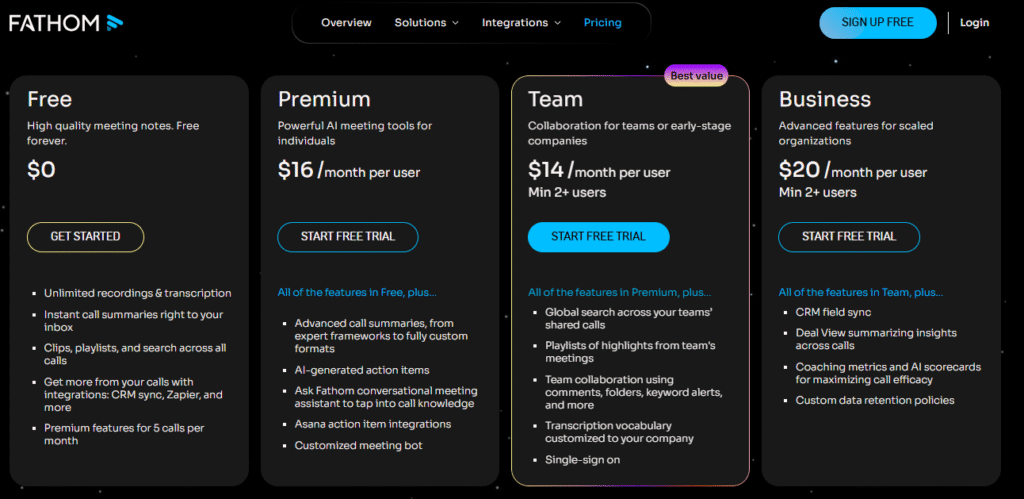
Fathom AI offers tiered pricing to accommodate different types of users: individuals, small teams, and larger organizations.
| Plan | Price | Key Features |
| Free | $0/month | Unlimited recordings and transcription, searchable archive, basic summaries, highlight clips, limited CRM integration |
| Premium | $15–16/month per user | Unlimited AI summaries, action-item extraction, “Ask Fathom” queries, advanced CRM and workflow integrations, priority support |
| Team / Business | $19–29/month per user | Team-wide shared library, global search, analytics, custom vocabulary, admin controls, enhanced security, CRM automation |
The free plan is robust enough for freelancers or small teams, but organizations with frequent meetings or complex workflows may benefit from premium or team plans. Paid plans unlock the most advanced AI features and collaboration tools, justifying the cost for teams that rely heavily on online meetings.
Pros and Cons
Pros:
Fathom AI excels in transcription accuracy, AI-generated summaries, and workflow integrations. The searchable archive and highlight clip features enhance accountability and clarity. Its generous free plan allows users to try the tool without financial commitment, and integrations with CRMs and project management platforms improve productivity.
Cons:
Fathom’s transcription accuracy can drop in noisy meetings or when multiple participants speak simultaneously. Advanced features are locked behind paid plans, and the tool only supports live online meetings; offline or in-person meeting transcription is not available. The presence of a bot participant can be distracting in sensitive meetings, and large meetings with complex discussions may require manual verification of transcripts and summaries.
Comparison with Competitors
| Feature / Tool | Fathom AI | Otter.ai | Fireflies.ai |
| Free-tier recordings & transcription | ✅ Unlimited recording & transcripts | ✅ Limited minutes | ✅ Limited minutes & storage |
| Live transcription & speaker labels | ✅ Yes | ✅ Yes | ✅ Yes |
| AI-generated summaries & action items | ✅ Yes (Premium) | ✅ Summaries available | ✅ Yes, includes analytics |
| Highlight clips & shareable moments | ✅ Yes | Limited | ✅ Yes |
| Integrations with CRM & productivity tools | ✅ Extensive | Moderate | Extensive |
| Privacy & data security | ✅ AES-256 encryption & compliance | Varies by plan | Varies |
| Offline/in-person support | ❌ No | Limited via uploads | Limited via uploads |
Fathom AI stands out for its combination of transcription, AI summaries, highlight clips, and workflow integration. While competitors may offer stronger analytics or offline transcription, Fathom is ideal for users who prioritize live meeting automation and post-meeting actionability.
Personal Experience
Using Fathom AI over several weeks revealed its value for managing remote meetings. Integration with Zoom was seamless, and the AI-generated summaries accurately captured key discussion points. Highlight clips were especially useful for sharing specific moments with colleagues without sending full recordings.
The searchable archive allowed me to quickly reference past decisions and follow-up tasks, saving hours of manual review. However, in meetings with more than six participants, speaker labeling occasionally became inaccurate, and transcription errors appeared in technical discussions with domain-specific terminology.
Overall, Fathom significantly reduced administrative overhead while improving meeting follow-up efficiency. It’s particularly beneficial for remote teams, sales calls, and client meetings, though sensitive or complex discussions may still require manual verification. I have also reviewed Claude AI. If you want to use it, you can check my Claude AI review.
Frequently Asked Questions
Is Fathom AI free?
Yes, the free plan includes unlimited meeting recording, transcription, and basic summaries. Advanced features require a paid plan.
Which platforms are supported?
Fathom AI works with Zoom, Google Meet, and Microsoft Teams.
Can Fathom handle offline or pre-recorded meetings?
No, it only supports live online meetings. Offline or pre-recorded files cannot be processed.
Is my data secure on Fathom AI?
Yes, Fathom uses encryption and adheres to compliance standards. Paid plans offer additional admin controls for team security
Who is Fathom AI best for?
Freelancers, small teams, project managers, sales professionals, and client-facing roles benefit most. Sensitive or offline meetings may require alternative solutions.
Does Fathom AI support multiple languages?
Fathom AI provides support for several languages, making it suitable for global teams. However, transcription accuracy may vary depending on accents and technical jargon.
Final Thoughts
Fathom AI is a comprehensive AI meeting assistant that automates transcription, summaries, highlight clips, and searchable archives, helping professionals manage online meetings efficiently. Its free plan covers core features, while premium options add advanced team functionalities. Although accuracy can drop in noisy meetings and offline support is limited, Fathom reduces administrative work and improves productivity, making it a reliable tool for tracking decisions and ensuring actionable, well-documented meetings.





