
This is essential in the current super-fast digital society, where automating routine tasks saves time, enhances efficiency, and allows for more time to focus on more critical business activities. The demand for automation tools has soared, with various platforms offering solutions to automate workflows. The most suitable one is n8n, which is flexible, easy to use, and has strong integration capabilities.
This review will examine how n8n can automate workflows without writing a single line of code.
What is n8n?
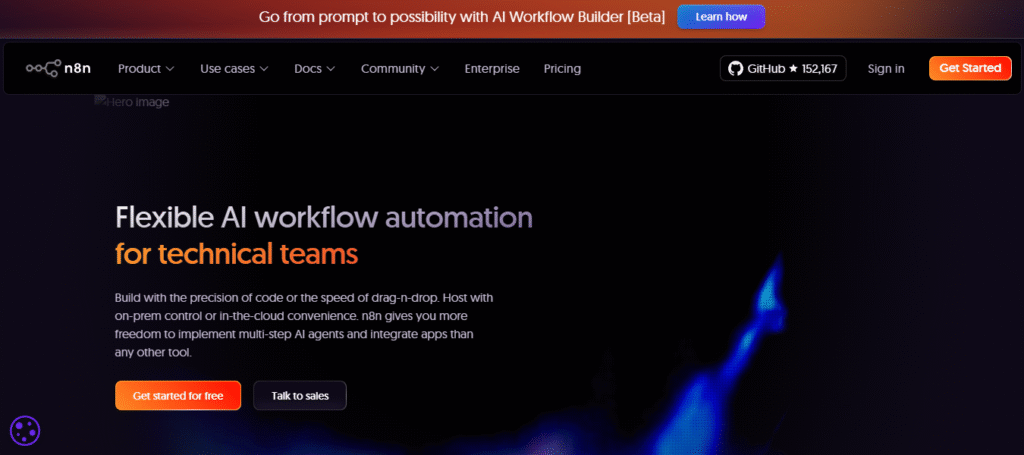
n8n is an open-source workflow tool that is robust and intended for technical teams. It enables users to automate their tasks by building workflows that connect to hundreds of services and applications. Using n8n, you can bridge tools and systems that are vital to your work, and in doing so, you can create complex processes and workflows that can automatically run.
The uniqueness of n8n lies in its flexible code and simple drag-and-drop functionality. Whether you’re a developer who requires such finer control over processes or a business owner who wants to have a tool that is easy to use, n8n has a solution for both.
Unlike the other AI automation tools, n8n can also be hosted on personal servers, providing flexibility to maintain data privacy and control. Furthermore, n8n is compatible with more than 500 applications, including popular platforms such as Slack, Salesforce, Gmail, and Google Sheets. Other ones are:
- Telegram
- Discord
- Google Drive
- Parabola
- Clockify
- GitHub
- GitLab
- Bitbucket
- Jira
- Anthropic
- Notion
- Microsoft SQL
- HubSpot
- Pushover
- ClickUp
- Trello
- Microsoft Outlook
This broad range of integrations makes it an attractive option for enterprises across different industries.
Key Features of n8n AI Automation
Learn about some extraordinary features that you will find in the n8n AI agent:
1. No-Code Workflow Automation
The no-code interface is considered one of n8n’s most striking features. It allows one to automate complex tasks without writing any code. With its easily upgradeable drag-and-drop feature, apps can be quickly and easily connected to establish workflows with no technical knowledge. To illustrate, you may automatically have emails, create reports, or make changes on Slack according to a trigger from another platform.
2. Flexibility of Code
Although n8n is an excellent no-code automation engine, it also allows writing code where necessary. Users can add JavaScript and Python to workflows to enhance their functionality. This enables the development of more advanced workflows that are not limited by no-code options.
3. Extensive Integration Support
n8n has more than 500 integrations, including Google Sheets, Microsoft Teams, Salesforce, Slack, and Zoom. It doesn’t matter if you are combining an e-commerce tool with a CRM, a cloud storage provider, or even building a custom API; n8n can connect the dots and, therefore, can be used by businesses that use more than one tool to operate.
4. Self-Hosting and Privacy Control
Another major benefit of n8n is that it can be deployed on your own infrastructure. This gives ultimate control over your data and privacy. The other way around is you can also use the n8n cloud variant if you want the convenience of keeping your automation in the cloud.
5. Custom Workflows and Multi-Step Automations
You can use n8n to build multi-step workflows, where each step can trigger other steps across several apps. An example of this would be: once a form is received, n8n might automatically send the recipient a confirmation email, add the lead to your CRM, and create a task in your project management software.
6. Powerful Debugging and Testing Tools
N8n provides easy troubleshooting workflows through the built-in debugging tools. Operations can be tested and adjusted without necessarily running the entire process. This simplifies error detection and correction, minimizing downtime and enabling smooth operations.
7. AI Integrations
n8n also provides integrations with AI services, which you can use in your workflows via natural language processing (NLP) or machine learning (ML) models. For instance, n8n can be used to automatically process customer feedback or review sentiment and adjust marketing accordingly.
User Experience & Interface
The n8n offers a seamless and user-friendly interface. The visual workflow editor provides an opportunity to visually drag-and-drop nodes (to depict automation processes), and each of these nodes symbolizes a particular app or action.
Another feature of this AI automation is real-time monitoring, which lets you see the precise progress of your workflows. The dashboard is very clear and well-organized, providing a guide to all your workflows and making them easier to control and streamline.
For developers, the ability to inspect logs, set things, and view workflow history provides transparency into their automation processes. Plus, there’s an active community forum and resources to help you get the most out of n8n.
Pros and Cons
Here are some pros and cons of n&n:
| Pros | Cons |
| Flexible, no-code workflow automation | Requires technical knowledge for advanced features |
| Over 500 app integrations | May require a learning curve for new users |
| Self-hosting option for better data control | Some complex workflows may require custom coding |
| Highly customizable with code options | The user interface can be overwhelming for beginners |
| Open-source, free to use | Limited customer support for free users |
| Active community and frequent updates | The cloud version can get costly for large teams |
Comparison with Alternatives
n8n competes with several other workflow automation platforms, including Zapier, Integromat (now Make), and Trello. Here’s a quick comparison to help you understand how n8n stacks up against its alternatives.
| Feature | n8n | Zapier | Integromat (Make) | Trello |
| Ease of Use | Easy for non-technical users | Very easy | Moderate | Very easy |
| Code Flexibility | Yes, supports JavaScript/Python | No | Yes | No |
| Custom Hosting | Yes | No | No | No |
| Integrations | 500+ | 5,000+ | 1,000+ | 250+ |
| Free Plan | Yes, self-hosted | Yes, with limitations | Yes, with limitations | Yes, with limitations |
| Pricing | Affordable, open-source | Expensive at scale | Affordable | Affordable |
While Zapier offers a huge number of integrations, n8n provides a similar range with the added advantage of self-hosting and greater flexibility. Integromat is also a strong contender with powerful features, but n8n’s code flexibility and open-source nature set it apart from other tools.
Pricing & Plans
n8n offers three main pricing options:
- Free Plan: The open-source version, perfect for self-hosting. You get full control and access to all features without any cost.
- Cloud Plan: This version is for those who want the convenience of cloud hosting. Pricing starts from $20/mo and scales based on the number of workflows and users.
- Enterprise Plan: For large teams or businesses that need advanced support, custom integrations, and dedicated servers. Pricing varies based on the scale and specific needs.
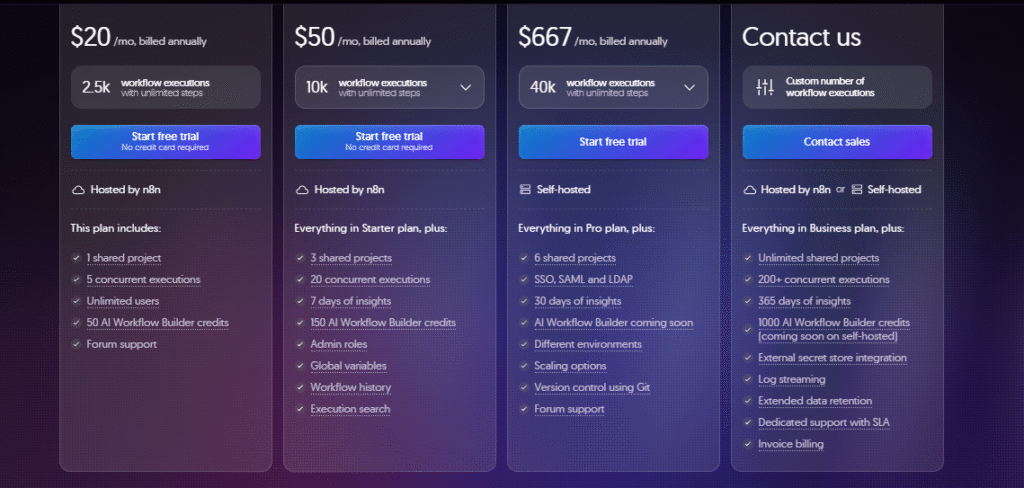
The self-hosted option is free, making it an excellent choice for smaller businesses or those who prefer complete control over their data. However, if you prefer cloud hosting with additional support, the pricing remains competitive compared to other automation platforms.
Who Can Use n8n?
n8n is designed for both technical and non-technical teams. Here are a few examples of teams that can benefit from n8n:
1. IT Operations
- What n8n does: IT departments can automate other processes within the organization, such as integrating new staff into organizational systems (onboarding) or linking various IT solutions (e.g., server management software, human resource systems).
- Examples of automation: Include Deprovisioning new employees, integrating ticketing with human resources software, and managing tasks for cloud infrastructure.
2. Security Operations
- Their use of n8n: Security teams can automate security workflows and reduce incident response times by gathering and enriching data on security tickets and even executing automated responses in response to security alerts.
- Examples of automation: Improving security alerts with threat intelligence data, automatically creating tasks for security analysts, or integrating with incident management tools.
3. Sales Teams
- What they use with n8n: Sales teams can automate repetitive activities across lead generation, customer management, and CRM integrations. n8n is helpful because it pulls data together, automates follow-up, and enables actionable insights.
- Via automation: Creating transactions based on the individualized follow-up email, integrating CRM data in different systems, or receiving more insights via sales reports to make decisions.
4. DevOps Teams
- What they do with n8n: n8n can automate most DevOps workflows for software deployment, continuous integration, and system monitoring. This will save time and minimize the risk of human error when deploying a critical deployment.
- Automation examples: Automating deployment on code pushes, adding deployment notifications, or triggering health checks and alarms when required for server health.
You can use a windsurf code editor to assist in developing software. You can check our windsurf review to decide whether you have to use it or not.
5. Marketing Teams
- How they use n8n: Marketing teams can use n8n to automate repetitive processes, such as social media publishing, email campaign management, and integration with marketing tools like Google Ads or Mailchimp.
- Examples of automation include: Costumes, Scheduling, publishing social media updates, drip marketing emails, comparing data across two or more marketing channels, and creating performance reports.
Even if you don’t have a technical background, n8n’s no-code options allow you to automate tasks like sending emails, scheduling social media posts, and generating reports.
FAQs
Q1: Is n8n free?
Yes, it has an open-source, self-hostable version of n8n. The cloud version has a subscription plan.
Q2: Can I use n8n without coding knowledge?
Absolutely! The drag-and-drop interface n8n provides helps you create workflows without writing any code. But, in case you want to be more in control, you can utilize JavaScript or Python, too, in your workflows.
Q3: Does n8n support integrations with my favorite apps?
n8n also offers more than 500 integrations with popular apps such as Slack, Google Sheets, Salesforce, Zoom, and more.
Q4: How can I host n8n?
You can either self-host n8n using your personal server or subscribe to the cloud-based n8n version.
Q5: Is n8n suitable for large enterprises?
Yes, n8n also offers an enterprise plan with additional features and specialized infrastructure tailored for large companies.
Final Verdict… Is n8n Worth It?
To sum up, n8n is the best workflow automation tool because it offers the benefits of both worlds. Technically, it is flexible and easy to use with a drag-and-drop interface, and Business-wise. It is unique for its open-source and wide integrations, and you can also host it on your own server, giving you more control over your data.
N8n is also a platform worth considering if you need a flexible, customizable automation platform, especially if you have some basic coding knowledge or can afford the time to learn. No matter what work you are automating customer care, customer marketing, or within your company, n8n has the solutions to automate your processes.






